


Basic
0,00 €/ month
Current location
1 movement notification
3 super signals to reach your kid


Being parent is tough, but we have a simple solution to ensure their ways of exploring the world are safe
You will need only 5 minutes and your kid’s phone or GPS watch
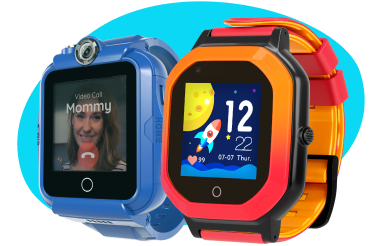
 Audio and video calls
  Accurate GPS location (up to 15 ft.)
  IP67 waterproof - wash hands without fear
  All benefits of the Findmykids app subscription as a gift forever
Review from Google Play
Works well. The phone needs connection through WiFi or data. The recording of sound and listening around the childs enviroment is good, also you can send a loud signal sound to your child's phone to attract their attention to their phone. plus the child's phone has an 🆘 which they can use to send a loud signal sound to your phone which works even if your sound is off, only thing is it doest show road names on maps when viewing child's location on Maps. The app has improved. Great app.

Review from Google Play
Really happy with this app. It not only keeps your mind at peace by notifying you about your child's precise location and when they leave or arrive at certain premises but it also has this unique feature which allows you to listen to their surrounding which adds another huge layer of security itself as we know they are doing okay and are safe. Happy with the trial and going to buy subscription.

Review from Google Play
This app is fab, especially if you have a child like mine that is so laid back it's ridiculous and never answers the phone! Not only can you see your child's location in real time, you can listen into their surroundings if they don't answer the phone. This has been a game changer for my child and I.

Review from Google Play
Excellent and reliable. I first installed this on a test phone and I was so happy that I bought a lifetime subscription. Then I purchased gps watches, because they're easier for younger kids to have at all times. Now that the kids have phones, this is an exceptional app. I love that I can watch their route in real-time. It gives me HUGE peace of mind.

Review from Google Play
Amazing.. My son likes to walk him self to school with friend's as we live close and he's nearly 10, we both love the features and I can follow him to a T if needed definitely worth the upgrade aswell if you want more features! But on the free version is still very useful and easy to use for both myself and son.

Review from Google Play
This app is the best and worth the price, I can see my daughter's whereabouts plus see if her phone battery percentage and if it's on loud or silent. it also has a messaging system so if U have no credit U can still msg thru the app. amazing.










Current location
1 movement notification
3 super signals to reach your kid
Movements in real time
Movement notification
Super signals to reach your kid
Detailed routes on a map
Live chat support
Turn on family access
You can share the plan with 2 more close ones
Time in apps
App blocking on your kid's phone
App removal protection
Call filter
Premium icon
All benefits of the Care plan
Turn on family access
You can share the plan with 2 more close ones
82% of parents worry less about their children with Findmykids
Based on a survey of 8,400 Findmykids users
Millions of parents worldwide already use the Findmykids app
Download the app and worry less about your child

Findmykids provides free access to all features during a trial period, allowing users to fully evaluate the service and see whether it meets their family’s needs before purchasing a subscription. After the trial period, users can continue with the free Basic plan or choose a paid plan with additional features. The exact price depends on the subscription plan and billing period. For example, choosing an annual subscription results in a lower monthly cost than paying month by month.
You can check the current plans and prices in the app or on the website in the Purchase app subscription section.
Sound Around minutes are not included in the subscription and are purchased separately.
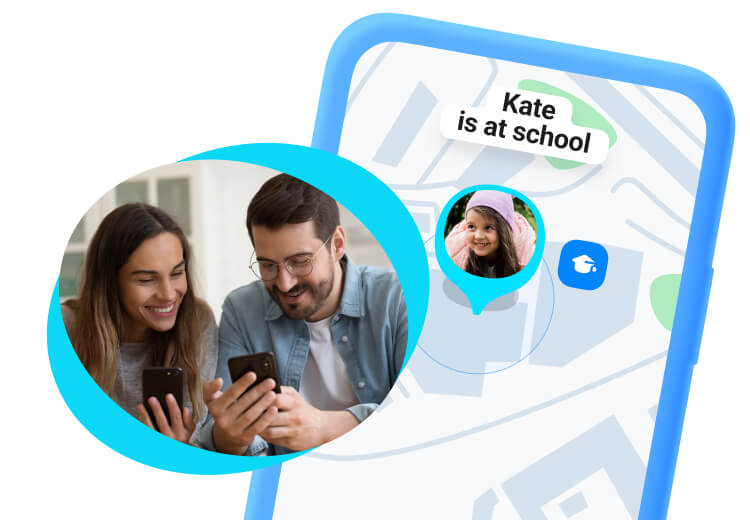
Parents can track their child at school with a free child tracking app like Findmykids. In the app, parents can see their child’s real-time location and set designated Safe Zones, such as their school, and receive arrival and departure alerts. That means when the child arrives at school each morning, parents get a notification on their phone and no more wondering if they made it or not.
Parents can also review the route their child took to school, including where they stopped, how fast they were moving, and whether they were walking, driving, or using another mode of transport. This can help parents better understand their child’s journey and spot anything unusual. Findmykids can also predict when a child is likely to arrive at school or get home from school, making it easier to plan around their arrival.
The Findmykids app is one of the best child tracking apps for Android and iOS, combining parental controls, GPS tracking, and Family Circles in a single app. The unique safety features, such as location history, Sound Around, Loud Signal, and Safe Zones, provide parents with peace of mind while their children are at school, with friends, or even gaining independence as they learn to drive.
In addition to real-time location tracking and safety features, Findmykids offers parental controls to manage children’s screen time, see which apps they use and for how long, and enable content filters.
To use the Findmykids app, the parent must download it to their smartphone, sign up for an account, and create a Family Circle with a unique invitation code. Then install the app on the child's or another family member’s phone and enter the invitation code to join the Family Circle and sync the devices.
Once the app is set up, you can access features for both online safety and location sharing. Digital safety features include setting screen time limits, content filtering, device usage analytics, and app blocking. Meanwhile, physical safety features include location tracking, route history, Safe Zones, movement notifications, Sound Around, Loud Signal, SOS signal, and frequently visited places.
For the app to work properly, you need to grant all requested permissions on both devices during setup, including background location access.
Parents can answer the question “Where is my child right now?” with the Findmykids family location-tracking app. After downloading and setting it up on both your device and your child’s device, you can simply open the app and see your child’s real-time location on the map.
The app also stores details of your child’s routes. Parents can view the start and end times, stops, speed, mode of transportation, and a trip safety assessment. This allows you not only to see where your child is, but also to better understand how they got to their destination.